The gtm-api Free Plan
One LinkedIn account, the full UI, API and MCP, no card. What runs unlimited, what runs on a daily allowance, and what stays paid.
The GTM API free plan gives one connected LinkedIn account the whole product: the interface, the REST API and the MCP server, for one user, with no card and no expiry. The plan is metered, not cut down. What it meters is how many actions of each type you can run per day, and webhooks too: one endpoint on the free plan, 100 on a paid one.
The numbers are smaller than on a paid plan, and each of them sits well inside LinkedIn’s own ceilings for one account. The metering itself is the same on every plan. 20,000+ LinkedIn accounts run on this stack, and under 1% of them have ever been restricted.
On this page
What the free plan includes
The whole GTM API product on one connected LinkedIn account, for one user, with no card and no expiry. The plan documentation calls it Sandbox, the forever free plan. You can drive that account from the interface, from your own backend over REST, or from an AI agent over MCP, and it is the same contract underneath all three.
- One connected LinkedIn account. It runs in one parallel cloud browser session, so a single agent works the account at a time.
- One user. The workspace is single seat, which is what makes this a plan for running your own profile.
- The full action surface. Outreach, engagement, scraping, enrichment, inbox and network operations are all reachable. The endpoints are the ones paid accounts call.
- No card and no expiry. The account does not lapse into a paywall after a fortnight.
Two things are off rather than metered: team members, since the workspace is single-user, and the AI copilot. The AI Assistant in the API docs is a different thing and stays free. Realtime message push is off as well, which shapes how the webhook works further down.
Peter Kaliuzhny, a GTM API expert, walks the plan end to end in the video below. It was recorded before the free plan gained its webhook, so where it calls webhooks paid-only, the webhooks section is the current answer.
The daily caps in one table
Every action type has its own daily allowance on the free plan, and the allowance is checked before the call runs. Here is the whole grid, per connected account, per day.
| Bucket | Action | Free plan, per day | What one unit is |
|---|---|---|---|
| Sync | Full sync of every surface | Included, once a day | Profile, connections, inbox, invites, premium status |
| Sync | Database reads | Unlimited, free | One query against your synced data |
| Sync | Self-syncs | 40 | One surface refreshed on demand |
| Outreach | Connection requests | 5 | One invitation sent |
| Outreach | Messages | 10 | One message sent |
| Outreach | InMails | 5 | One InMail sent |
| Outreach | Posts | 4 | A post published or scheduled, or a change to the scheduled queue |
| Engagement | Profile visits | 8 | One profile opened |
| Engagement | Comments | 5 | One comment on a post or on a comment |
| Engagement | Reactions | 5 | One reaction |
| Engagement | Endorsements | 5 | One skill endorsed |
| Data | Scraping | 15 | One page of results, 25 leads on a Sales Navigator page |
| Data | Enrichment | 12 | One person |
| Housekeeping | Messaging general | 15 | One inbox operation |
| Housekeeping | Networking general | 6 | One invite, connection or degree operation |
| Housekeeping | Profile edits | 2 | One edit to your own profile |
| Housekeeping | Custom requests | 9 | One raw LinkedIn call on your own account |
| Webhooks | Registered endpoints | 1 | One endpoint, any event types |
A few points about that table matter more than any individual number in it.
- The caps are per connected account. They travel with the account, so a second account is a plan question and never a way to double a bucket.
- They cap volume and never access. Nothing in the free plan is a stub or a preview. A call you can make at 5 a day is the same call a paid account makes more often.
- These are plan allowances and belong to GTM API. LinkedIn runs its own ceilings on top, and the daily numbers here sit well inside them. Anyone planning real sending volume should read them next to LinkedIn limits and scaling LinkedIn outreach.
Some rows count something other than what their name suggests.
- Posts, 4 a day. They cover a publish plus the queue work around it: scheduling, rescheduling, removing a draft. One post a day is about what a single profile puts out anyway, so the cap rarely bites.
- Comments and reactions, 5 each. Both work at two levels, on a post or on someone else’s comment.
- Scraping, 15 pages. A page, not a person. A Sales Navigator results page carries 25 leads, so 15 pages is up to 375 leads a day off search alone, and the same unit covers the people who commented on a post or everyone who engaged with it.
- Enrichment, 12 people. Your account visits one profile and pulls its current data back, which suits a decision about one person: whether a commenter is worth a reply, whether to accept an invitation.
- Messaging general, 15. Working the inbox itself: marking a thread read or unread, creating a group chat, downloading an attachment, reacting to a message, muting a group.
- Networking general, 6. Withdrawing an invitation you sent, removing a connection, accepting or ignoring an incoming invitation, and checking the degree of connection to a lead.
- Profile edits, 2. Enough for a headline swap or a section update without turning the profile into a moving target.
Scraping and enrichment both run on your own LinkedIn account, which is what keeps the data fresh and also what makes it worth pacing. Bulk list building at volume is a job for tooling that does not touch your profile at all, and the trade-offs between the two approaches sit on the LinkedIn API guide.
Smart limits on top of the plan caps
The numbers in the caps table are the most the free plan will ever allow, but they are not what a fresh account starts at. On top of the plan cap, GTM API runs smart limits, a warmup engine that starts a newly connected account low and raises its allowance day by day. Smart limits work exactly the same on free and paid plans, and they are yours to control: switch them off and the account goes straight to the plan caps, or leave them on and let the account warm up toward them. The only free-plan difference is where the warmup curve tops out, which is the free tier’s own ceiling.
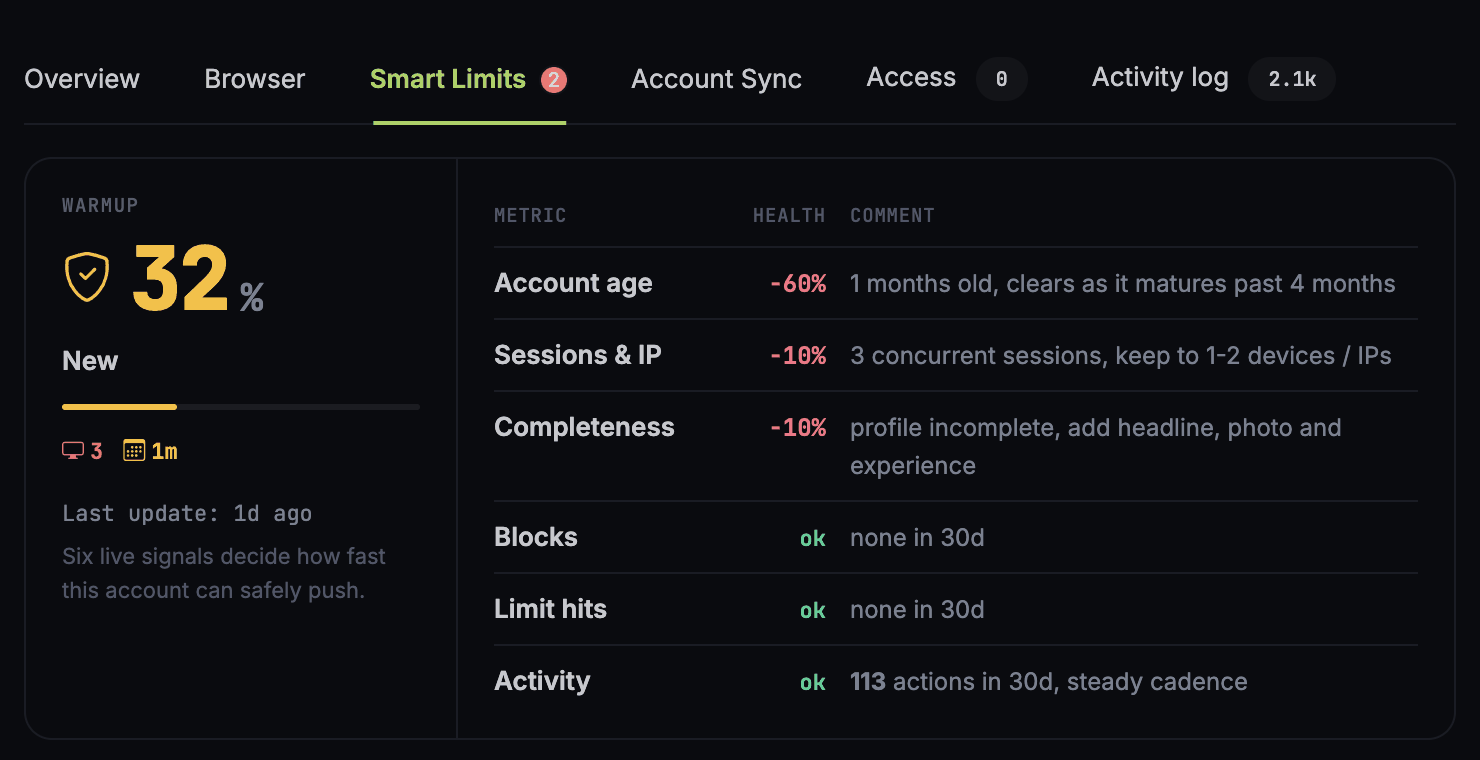
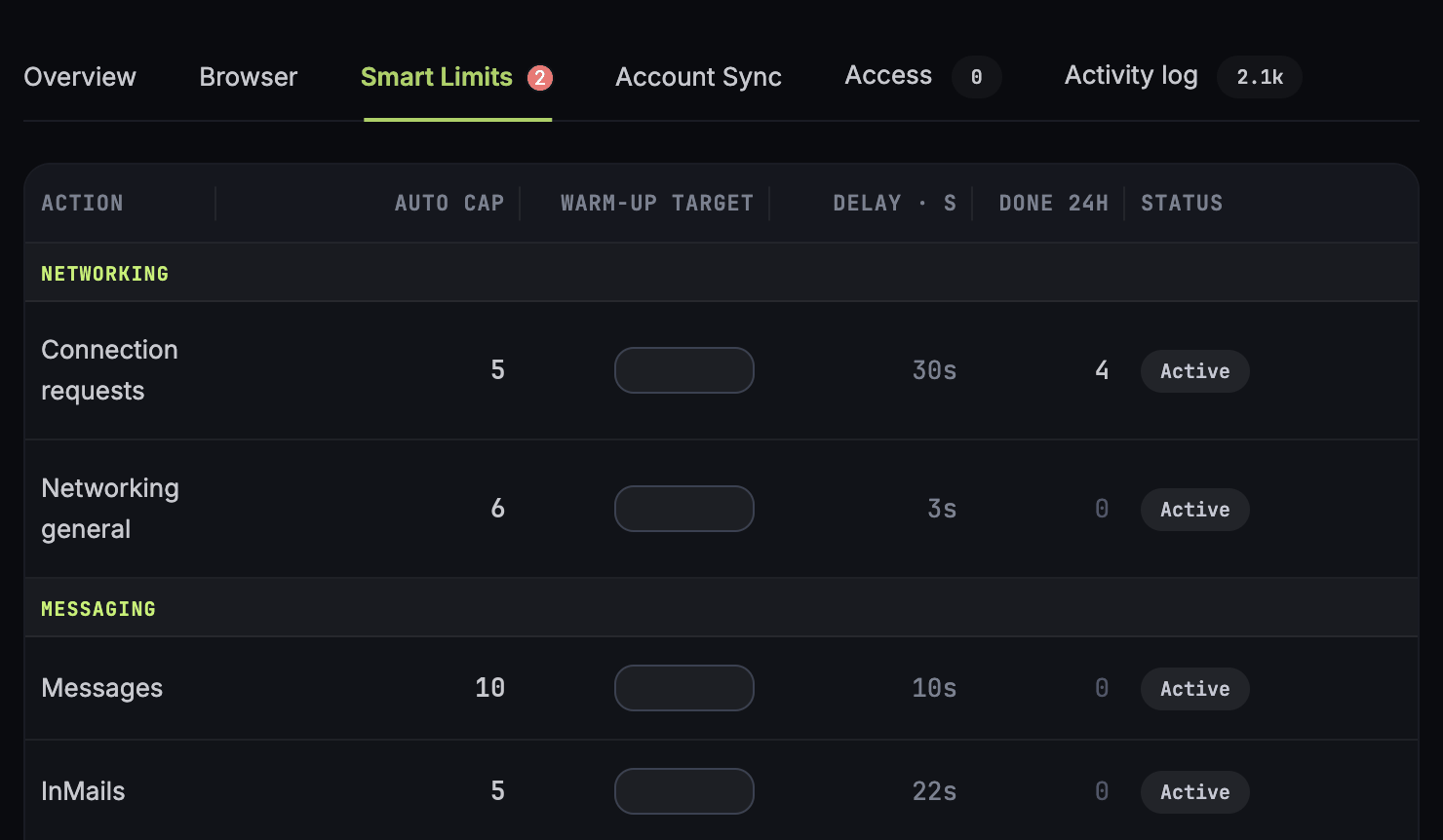
To see it for your own account, open the account from the accounts list and go to the Smart Limits tab of the drawer. The warmup score at the top multiplies six live signals into the day’s allowance, and the auto cap on each action below is what that allowance comes to today. That auto cap is the smart limit, the one you can switch off. The free plan’s ceiling from the caps table applies on top, and the lower of the two is the one enforced, so on the free plan an auto cap never runs above the plan’s figure: 5 connection requests, 10 messages, 5 InMails a day. The check runs before the action does, so an agent in a loop gets refused rather than discovering the problem in the account’s health afterwards. When a call comes back rate_limited, the bucket named on that tab is the one you emptied.
How your data gets in: syncs and free reads
The first sync comes before anything else. A freshly connected account is not usable straight away. The inbox has to be pulled in properly, and the database has to be built up far enough to answer questions like whether you are connected with a given person. GTM API runs that first pass deliberately slowly, which is the safe way to do it and also the slow way, so a large account with years of history can take a while. Calls made while it is still syncing come back refused, which is expected and nothing to report. Once it is done the account goes live, and every bucket becomes available at once.
Then a free sync runs once a day. On a schedule, GTM API refreshes every surface on the account without touching any allowance:
- Profile info and health. Who the account is and what shape it is in.
- Connections. The network as it stands.
- Inbox. All conversations and the messages inside them.
- Sales Navigator inbox. Kept separately from the regular one.
- Sent invites. What you have out and pending.
- Incoming invites. What is waiting for a decision.
- Premium status. Which tier the account is on.
An agent on a morning schedule wakes up to the whole inbox, the new connections and the pending invites, and spends its first calls deciding what to do about them.
On top of that, 40 self-syncs a day, on your schedule. One request refreshes one surface, a row on the Account Sync tab, so the budget is 40 surface refreshes and you decide how to spend them: asking for conversations and for invitations is two of the 40. An hourly inbox refresh through a working day costs well under half. A short burst is the other useful shape: publish a post, refresh the engagement surface every five minutes for half an hour while the comments arrive, then go quiet. Match the rate to how fast a surface changes: an inbox rewards a steady poll, and premium status needs nothing between daily passes.
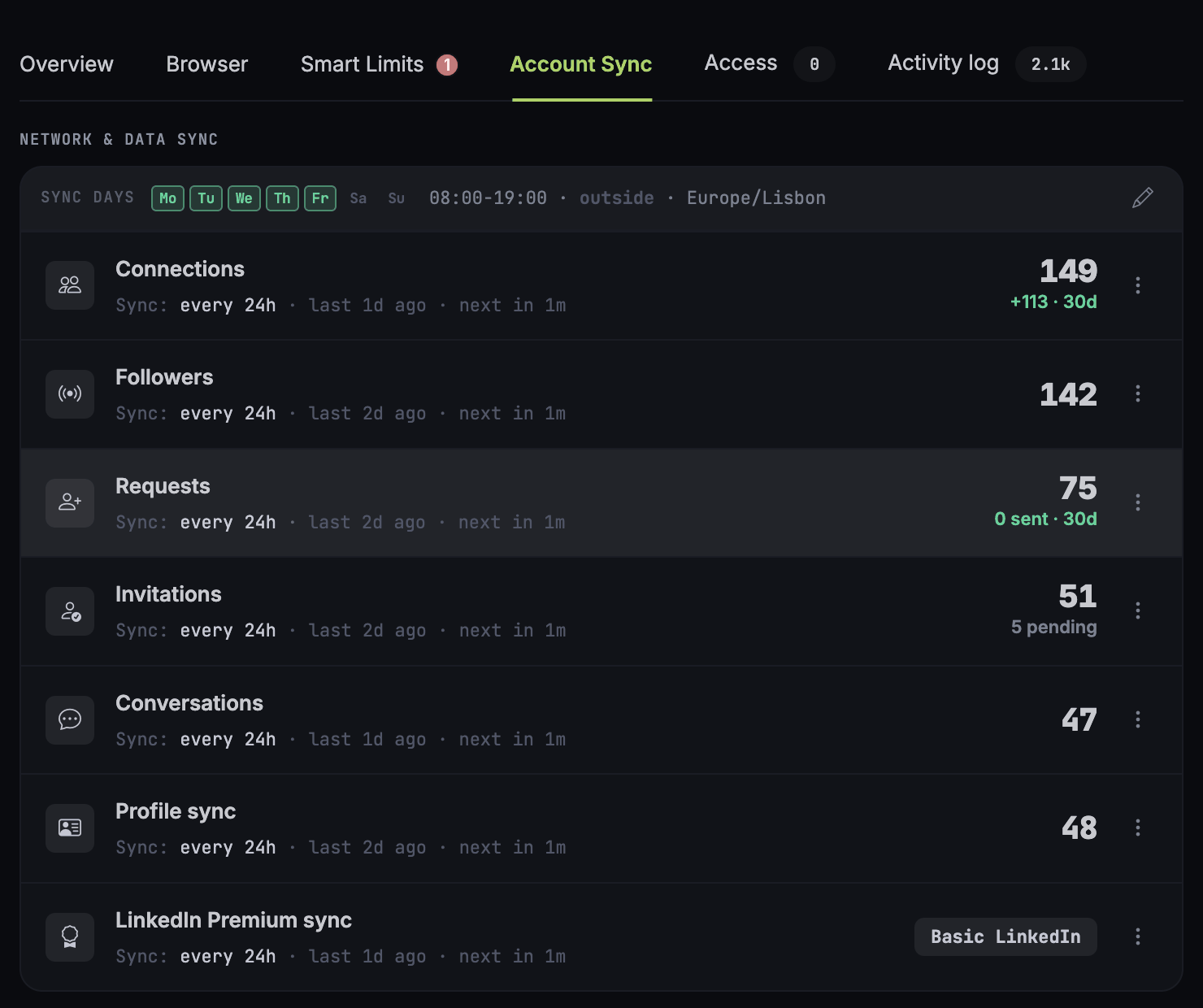
Reading what was synced costs nothing. Queries against the stored data are unlimited and free, with no bucket touched and no daily ceiling. These are the small questions an agent asks before it does anything else. Am I connected with this person. Have we ever had a conversation. When did I last message them, and what kind of message was it. Has anyone else on the team been in touch. Answering those out of a local dataset lets an agent check its facts as often as it likes, with the whole daily allowance still intact for the calls that change something.
One webhook fed by your syncs
The free plan includes one webhook. That is one registered endpoint, and it can subscribe to every event type the platform sends. A second registration comes back refused with webhook_limit_reached, and a paid plan carries 100.
What the free plan leaves out is the realtime part. On a paid account, while its browser holds a live LinkedIn session, a new message reaches your webhook within seconds of arriving. Keeping that session open all day means running the account continuously on a server, and the free plan does not do it. So on a free account the webhook fires when the platform finds out, which is when the daily pass or one of your self-syncs reads what changed.
That turns the 40 self-syncs and the webhook into one loop. Schedule an inbox self-sync every half hour across a sixteen-hour day, which is 32 of the 40, and each pass that finds something new delivers it to the webhook. Your agent reacts to what arrived and never has to compare the inbox against its last copy. The worst-case delay on a new message stays at thirty minutes. Tighten the interval on the surfaces that matter and leave the rest to the daily pass.
One thing to plan around: a trigger in n8n, Make or Zapier registers a webhook of its own. On a free workspace that is one trigger at a time, so if a workflow needs several event types, point the one trigger at an entry workflow and branch from there. The event list and the signature check are in the webhooks guide.
When to move to a paid plan
The free plan runs out in one of a few ways: you need a second LinkedIn account, a teammate in the workspace, more than one webhook, or a new message reaching your agent within seconds instead of at the next sync. A paid plan covers all four, with more connected accounts, team members, 100 webhooks and realtime push while an account’s browser holds a live session, and its daily allowances sit higher under the same smart limits. Paid plans start from $10 per connected account per month, and the current grid sits on the pricing page.
Frequently Asked Questions
Does the GTM API free plan expire?
No. It covers one connected LinkedIn account for one user, with no card required and no end date. The documentation calls it Sandbox, the forever free plan. Paid plans start from $10 per connected account per month and add more accounts, higher daily allowances and 100 webhooks.
How many LinkedIn actions can I run per day on the free plan?
Per connected account, per day: 5 connection requests, 10 messages, 5 InMails, 4 posting actions, 8 profile visits, 5 comments, 5 reactions, 5 endorsements, 15 pages of scraping, 12 enrichments, 15 general messaging operations, 6 general networking operations, 2 profile edits and 9 custom requests (raw LinkedIn calls on your own account). Alongside those you get 40 self-syncs, one free full sync of every surface, and unlimited reads of your synced data.
Why are my API calls refused right after I connect an account?
Because the account is still in its initial synchronization. That first pass builds the inbox and the connection data the rest of the system reads from, and it runs slowly on purpose, so a large account with a long history can take a while. Most activities and API calls stay unavailable until it completes, then the account goes live and every bucket opens at once.
What counts as one scraping unit and one enrichment unit?
Scraping is counted in pages of results, and one Sales Navigator search page holds 25 leads, so the free allowance of 15 pages is up to 375 leads a day. Enrichment is counted in people: one request is one profile visited from your own account, with the current data pulled back, and the free allowance is 12 a day.
What is a self-sync, and how is it different from the daily sync?
The daily sync is automatic. Once a day GTM API refreshes every surface on the account for free: profile and health, connections, the inbox, the Sales Navigator inbox, sent invites, incoming invites and premium status. A self-sync is the same refresh triggered by you, at a moment you choose, and one request covers one surface. The free plan carries 40 of them a day.
Can I use webhooks on the free plan?
Yes, one. The free plan includes one webhook endpoint, and it can subscribe to every event type. There is no realtime push on the free plan, so a LinkedIn event such as a new message reaches the webhook when a sync reads it: the daily pass, or one of your 40 daily self-syncs. A half-hourly inbox self-sync over a sixteen-hour day costs 32 of them and caps the delay at thirty minutes. A trigger in n8n, Make or Zapier registers its own webhook, so one trigger runs at a time.
Do database reads count against a daily allowance?
No. Queries against your own synced data are unlimited and free, so an agent can check whether you are connected with someone, whether you have messaged them before or when the last message went out, as often as it likes. The answers reflect the last sync, so for a fact that has to be current right now use a self-sync or a degree check instead.
Sources & Further Reading
- Free plan documentation, docs.gtm-api.com, Billing and plans (“Sandbox, the forever free plan”), read 13 October 2026, the one webhook included
- Walkthrough video, “gtm-api Free Plan in 6 Minutes: Manage Your LinkedIn with AI Agents for Free (Every Limit)”, gtm-api.com on YouTube, 16 September 2026. It was recorded while the free plan had no webhook, so the webhooks section on this page supersedes what it says about them
- Full walkthrough video, “GTM API Free Plan: Manage Your LinkedIn with AI Agents for Free (Every Limit Explained)”, gtm-api.com on YouTube, 27 August 2026. The full-length tour, also recorded before the free plan gained its webhook, so the same caveat applies
- Free plan daily allowances per action bucket, published by gtm-api.com in the plan documentation, read 17 October 2026. The Smart Limits screenshots on this page show the tab as of October 2026, with the auto caps at the free plan’s daily figures
- Model Context Protocol, modelcontextprotocol.io, the open standard published by Anthropic in late 2024, which is how an agent reaches these actions
- Related: LinkedIn limits · LinkedIn MCP server · The LinkedIn API · The AI Assistant in the docs
Connect one account and see.
Create a free account, connect one LinkedIn profile, wait out the initial sync, then point your agent at it. No card, no expiry, and the whole action surface is there from the first call.

Last updated: October 2026 · Definitions and benchmarks verified at time of publication