The gtm-api.com AI Assistant
Open the assistant in the docs, describe the play in plain English, and let it name the endpoints.
Open the AI Assistant in the GTM API docs and describe the play you want in plain English. It is wired to the live API and to the changelog, so it answers with the endpoints that exist today and the order to call them in. That is the shortest route into the LinkedIn API, and it costs nothing on the free plan.
The problem with a large API is rarely the API. It is the first ten minutes. You know the outcome you want, you open the reference, and you are looking at a wall of endpoints with no idea which three of them are yours. Below is the two-minute video, then the walkthrough step by step, with screenshots from the live docs. The plays it suggests run on the LinkedIn accounts you connect, with limits checked before each action: 20,000+ LinkedIn accounts run on this stack, and under 1% of them have ever been restricted.
On this page
Where to start when you are stuck
In the opening of the video above, Peter Kaliuzhny, a GTM API expert, names the failure mode this page exists to fix: the API gives you so many capabilities that new users stall before the first call. Nothing is broken and nothing needs support. You simply cannot tell which endpoints are yours.
“This AI assistant can help you to understand what you can actually do right now. It’s connected to the current API. It’s connected to the changelog, so it knows everything that we’re shipping.”
That last part is the reason to prefer the assistant over any static list, including this one. The surface moves every week, so a page that enumerates endpoints is accurate on its publication date and slowly stops being true. The assistant reads the contract at the moment you ask.
What the AI Assistant actually is
It is a question-answering layer over the GTM API documentation set, with a live connection to the API contract and the release history. You get plain-English answers about which endpoint does what and what changed recently, without holding the whole reference in your head.

The assistant is one of four ways into the same information, and they suit different moments:
| Surface | Reach for it when | Reflects this week’s ships |
|---|---|---|
| AI Assistant | You know the outcome and not the endpoint. It answers in plain English and sequences multi-step plays | Yes, reads the API and the changelog |
| API reference | You know the endpoint and want exact parameters, response envelope and error codes | Yes, generated from the live contract |
| MCP tool discovery | You want the agent to pick the tool itself at runtime, inside Claude, ChatGPT, Cursor or any MCP client | Yes, the server lists its own tools |
| Changelog | Something behaved differently than it did last month and you want to know why | Yes, that is what it is for |
Anything the docs cannot see, because it depends on the state of your own account, goes to human support instead. The assistant is a knowledge surface. It does not read your workspace.
The walkthrough step by step
The example is a keyword-to-lead-list play: find posts on a keyword, pull the people who commented, then enrich them. The screenshots below run it on “GTM engineering”. The video asks the same question with a placeholder keyword.
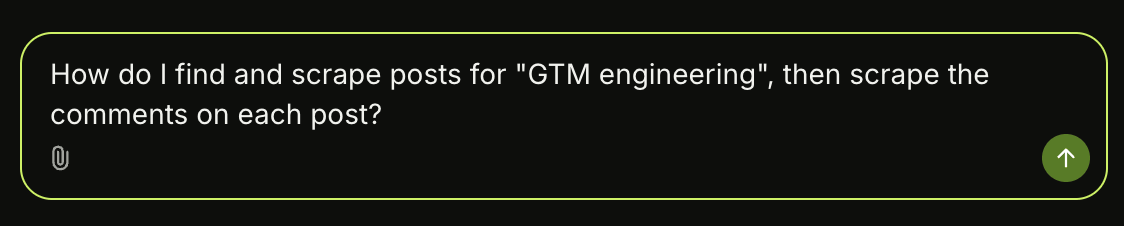
Step 1: Ask for the outcome in whatever English you have
Type the goal into the box at the bottom of the panel, one sentence in whatever English you have, and press enter or the green arrow to send. Note what the question does not contain: no endpoint, no toolset, no parameter. You name the outcome, and the assistant works out the calls.
Step 2: Read the chain it gives back
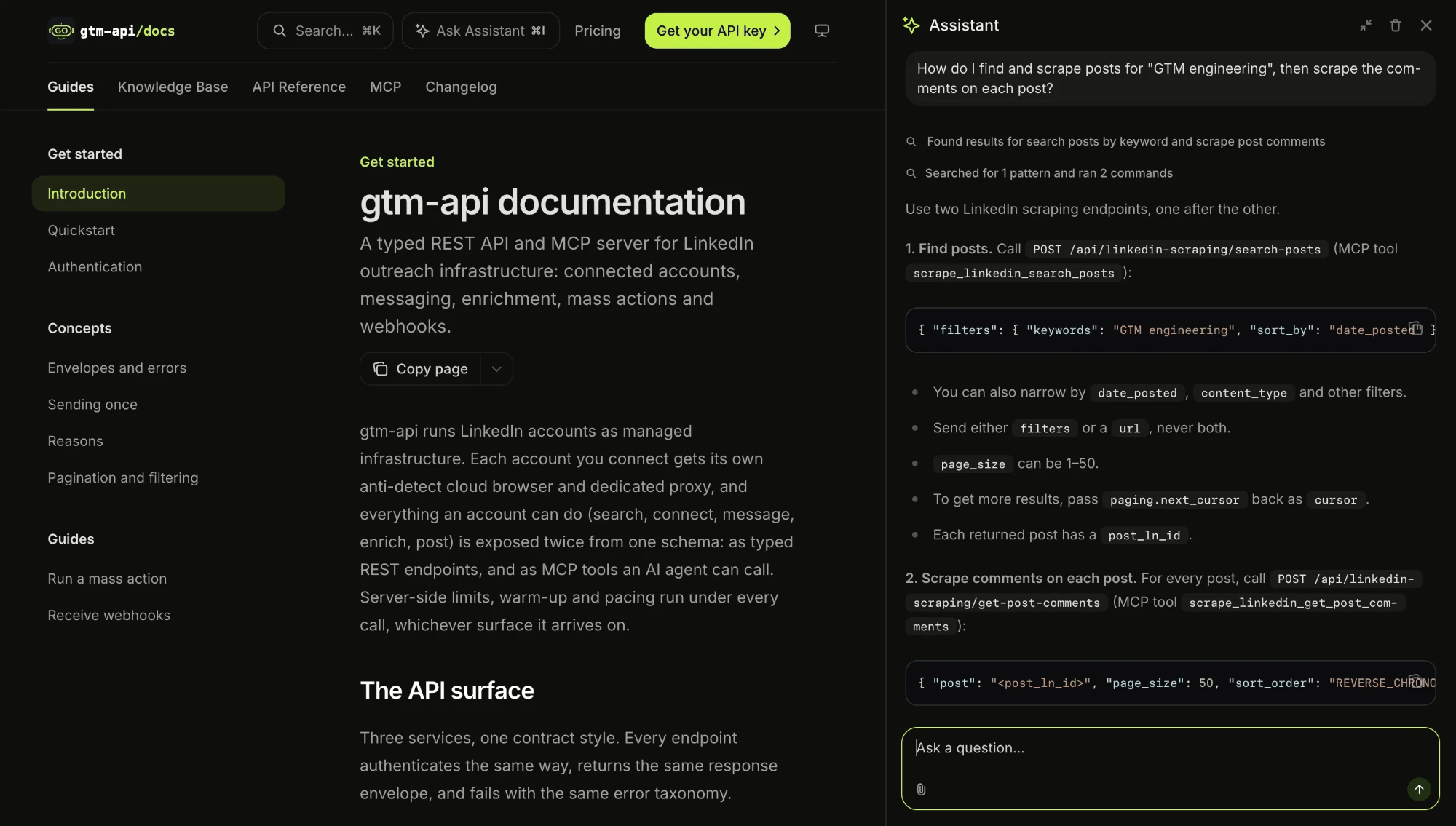
Under the second step the answer keeps going: both calls are paced, a 429 rate_limited carries a retry_after to wait out, and parallel calls on one account queue behind each other. It closes with links to both reference pages. That is the difference between a docs search box and an answer you can hand to a developer or an agent.
Step 3: Click an endpoint name to land on its reference page
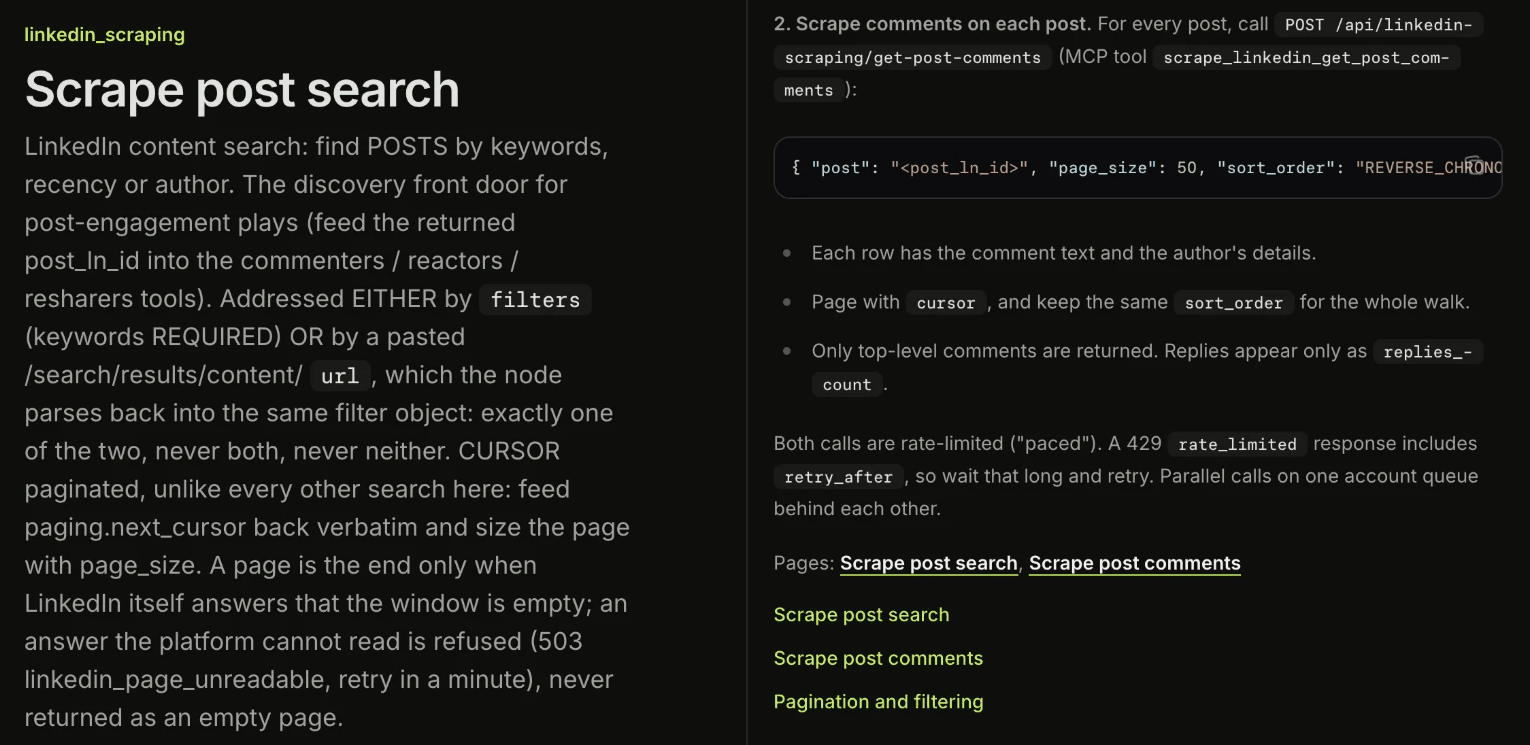
Step 4: Keep pulling on the thread
Each follow-up adds a step: the posts from one endpoint, the comments from the next, reactors if you want them, then enrichment. The useful habit is asking in the same thread, because the answers stack into a play you can schedule.
Good follow-ups are the boring ones: which call returns the profile URL, what a step costs against your daily allowance, what changed in these endpoints recently. Daily pacing is enforced server-side per account and the caps differ by action type, which is covered on the LinkedIn limits page.
Why your agent already understands gtm-api.com
The product is MCP-first, so Claude and other agent runtimes discover its tools without being taught. Model Context Protocol is the open standard Anthropic published in late 2024 for connecting models to external tools. Point an MCP client at the server, and the agent reads the tool list and picks its own calls.
The assistant still earns its place in two moments: when you want to understand the system yourself before pointing an agent at a live LinkedIn account, and when an agent stalls on an ambiguous request and you need the correct sequence to hand it.
The surface is large and it keeps growing. On 19 October 2026 the live MCP server listed 19 toolsets, among them accounts and account health, messaging, Recruiter, network, content, scraping, saved scraping jobs, enrichment, cloud browsers, webhooks, bulk actions, identity, access, billing and a support knowledge base. Any count quoted in a blog post, this one included, has a shelf life, which is the argument for putting the question to the server or the assistant. Setup for every client is on the docs page Connect a client, and what the agent can do with the server is on the LinkedIn MCP server page.
That is the whole way in: open the docs, describe the outcome, and follow the links from the answer into the reference. The assistant and the docs are open to anyone, with no account. When you want to run what it suggests, the free forever plan connects one LinkedIn account to the same endpoints paid accounts call, over MCP and REST, with no card. Paid plans start from $10 per connected account per month.
Frequently Asked Questions
What is the GTM API AI Assistant?
It is a question-answering assistant built into the GTM API documentation at docs.gtm-api.com. You describe what you want to do on LinkedIn in plain English and it replies with the endpoints that do it, in the order to call them. It is connected to the live API contract and to the changelog, so its answers reflect what is shipped today.
Where do I find the AI Assistant in the docs?
There is an “Ask Assistant” button in the top bar at docs.gtm-api.com, between the search box and the Pricing link. It opens a panel down the right-hand side of whatever docs page you are on, so you can read the quickstart, the API reference or the changelog and ask about it in the same view. You do not need a paid plan to use it.
Does the assistant know about endpoints shipped this week?
Yes. It reads the current API and the changelog, which is the difference between asking it and reading a guide that was accurate on its publication date. “What changed in the scraping endpoints this month?” is a reasonable question to put to it.
Is the AI Assistant the same thing as the GTM API MCP server?
No, they are two different surfaces. The assistant answers questions about the API in the docs, for a human reading. The MCP server exposes the API as tools an AI agent calls at runtime, so Claude, Cursor or any MCP client can run the actions themselves. A common pattern is to work the play out with the assistant, then let the agent execute it over MCP.
Do I still need the assistant if my agent already speaks MCP?
Often not, because an MCP client discovers the tools on its own. It earns its place in two situations: when you want to understand the system yourself before pointing an agent at a live LinkedIn account, and when an agent picks the wrong tool or stalls on an ambiguous request and you need the correct sequence to hand it.
What can I do on the GTM API free plan?
The free forever plan for individual users covers one connected LinkedIn account with the same typed endpoints paid accounts call, over both MCP and REST. The difference is the daily allowance per action type, which is lower and enforced server-side before each call. Paid plans start from $10 per connected account per month.
What should I ask the AI Assistant first?
Describe an outcome and ask for the call sequence, for example “find posts about a keyword, pull everyone who commented, then enrich them”. Naming the outcome gets you a chain of endpoints, where naming a category gets you a list to read. Good follow-ups in the same thread are which call returns the field you need, what it costs against your daily allowance, and what changed in that part of the API recently.
Sources & Further Reading
- Documentation and AI Assistant, docs.gtm-api.com (quickstart, authentication, knowledge base, API reference, MCP server and changelog, sections verified 26 August 2026)
- Walkthrough video, “How to Start with gtm-api.com: the AI Assistant That Knows Every Endpoint”, gtm-api.com on YouTube, 25 August 2026. The quotation above is transcribed from it. The screenshots were taken on the live docs on 19 October 2026
- Model Context Protocol, modelcontextprotocol.io, the open standard published by Anthropic in late 2024
- Toolset count of 19 read from the live gtm-api.com MCP server on 19 October 2026. Product and plans: gtm-api.com
- Related: LinkedIn MCP server · The LinkedIn API · LinkedIn limits
Ask it your first question.
Create a free account, connect one LinkedIn account, then open the docs and describe the play you want. The assistant names the endpoints and your agent runs them.

Last updated: October 2026 · Definitions and benchmarks verified at time of publication