Connect GetSales to gtm-api.com: Reuse a GoLogin Profile
Reuse the GoLogin profile a sender already runs on. No new browser session, no LinkedIn re-login, no change to the proxy.
A LinkedIn account that already runs automation in GetSales lives inside a GoLogin browser profile. That same profile can be attached to GTM API directly: pick Existing profile ID on the connect screen, paste the GoLogin ID, and the account comes online with no new browser session, no LinkedIn re-login and no change to the proxy it already uses. Two ways to get the ID, one through MCP and one through GoLogin’s own sharing.
On this page
The whole thing runs four minutes end to end. Every section below opens the same recording at its own timestamp, so you can jump straight to the part you are stuck on. At the end of it the account runs like any other on GTM API. 20,000+ LinkedIn accounts run on this stack, and under 1% of them have ever been restricted.
What connecting gets you
An account already sending from GetSales can be pointed at GTM API without being rebuilt. The profile it runs in is reused as is, so nothing about the account changes from LinkedIn’s side, and everything GTM API exposes becomes available on it: the REST API, the MCP tools an assistant can call, and the free tier for low-volume work.
The connect screen: two kinds of browser
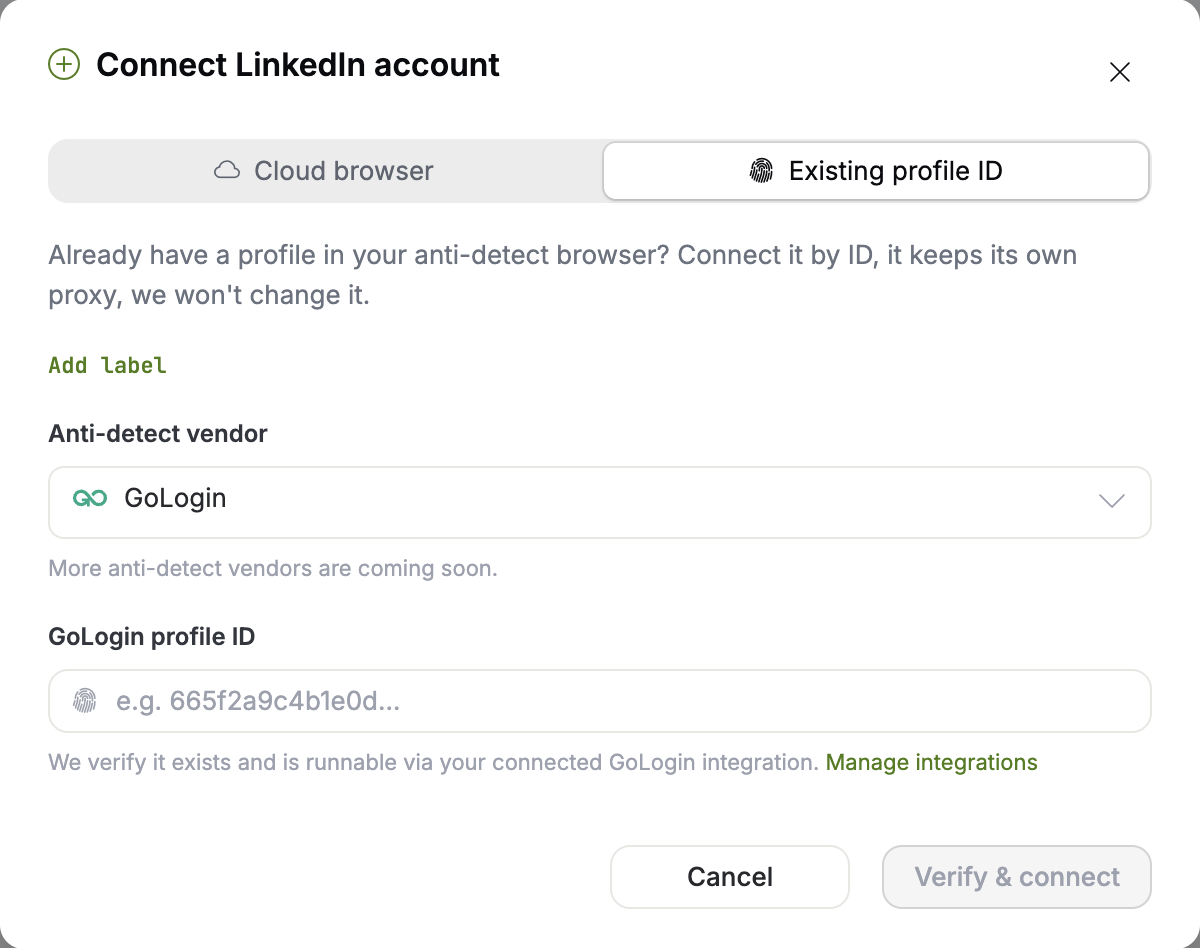
Every LinkedIn account on GTM API runs inside its own anti-detect browser profile, and the connect screen is where you decide whose profile that is. Open LinkedIn Accounts in the left rail, click Connect account, and the modal offers two tabs. Cloud browser has the platform mint a fresh profile behind a proxy it manages for you, and you sign into LinkedIn once inside that browser. Existing profile ID takes one you already run: per the GTM API docs the profile “keeps its own proxy”, and the platform only “verifies the profile exists and is runnable, and never changes it”.
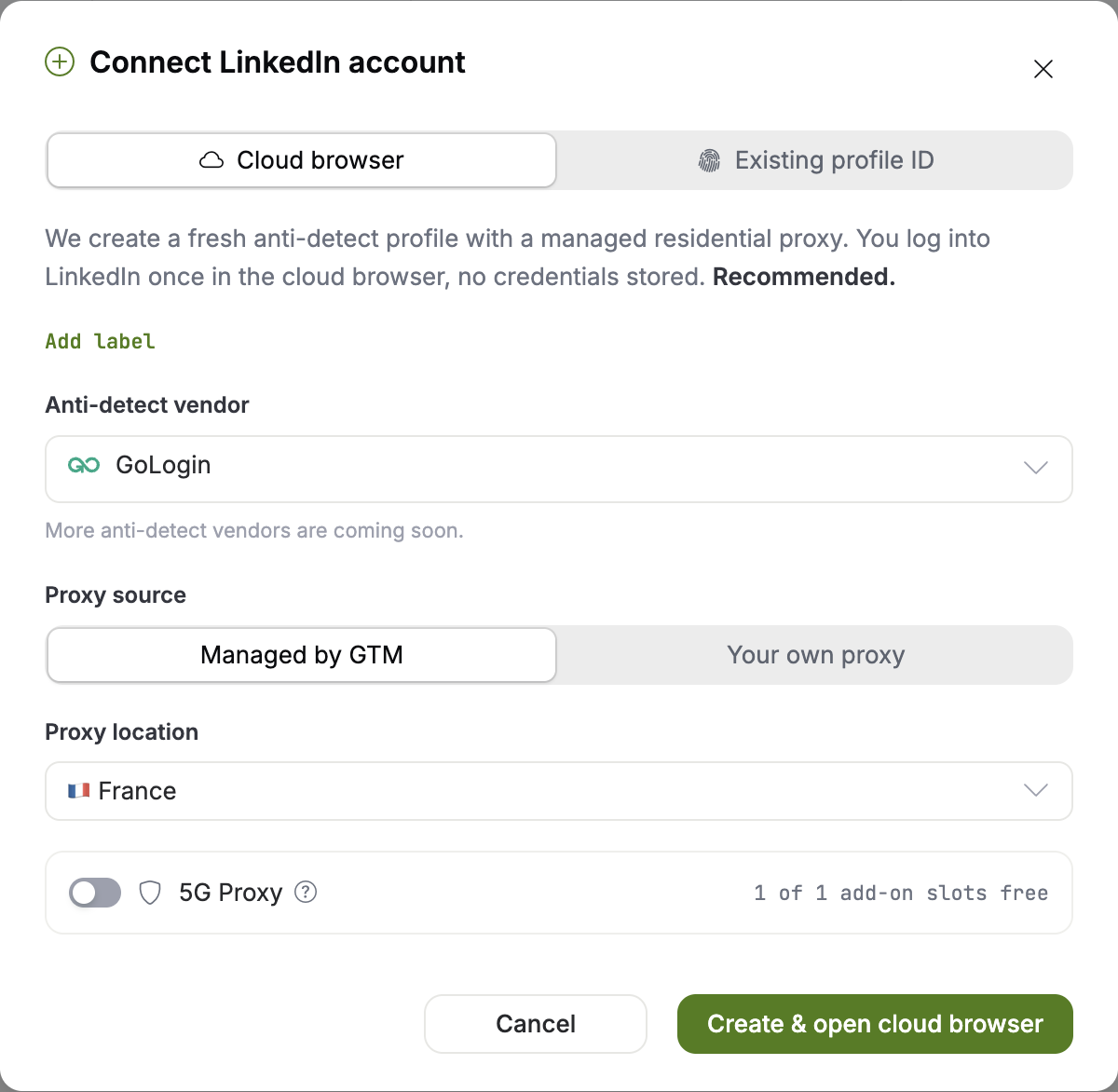
| Cloud browser | Existing profile ID | |
|---|---|---|
| Who provisions the browser | gtm-api.com mints a fresh anti-detect profile | You bring a GoLogin profile you already run |
| Proxy | Managed residential in a country you pick, or one you supply | The profile’s own proxy, untouched |
| LinkedIn session | New session. You sign in inside the browser window | The existing session, already signed in |
| What the platform writes to the profile | It owns and manages it | Nothing. It checks the profile runs, then leaves it alone |
| Best for | A fresh account, or one with no anti-detect setup of its own | An account already automating somewhere else |
Route 1: ask the agent for the ID
The fastest route skips both interfaces. Both products ship a Model Context Protocol server, so an assistant with both connected can read the ID out of one and create the sender in the other. The protocol is what makes that composable: the MCP spec describes itself as “an open-source standard for connecting AI applications to external systems”.
Install the GetSales MCP server, then add the GTM API MCP server to the same client, and send this:
Use my GetSales MCP, find GoLogin IDs of my profiles,
then use GTM API MCP to connect a new sender using the GoLogin ID.
Nothing is typed by hand and nothing is copied between two browser tabs, so the ID never has to be read off a screen correctly. If the client is not wired for MCP yet, the docs page Connect a client has the setup for Claude, ChatGPT, Cursor, VS Code, Claude Code, Codex and any other MCP client.
Route 2: copy the ID out of GoLogin
Without MCP the same ID is two minutes of clicking. GetSales can share a sender’s GoLogin profile with any GoLogin account, so you share it with your own and read the ID there.
- A free GoLogin account. Sign up at gologin.com. The free tier is enough, since you are only receiving a shared profile.
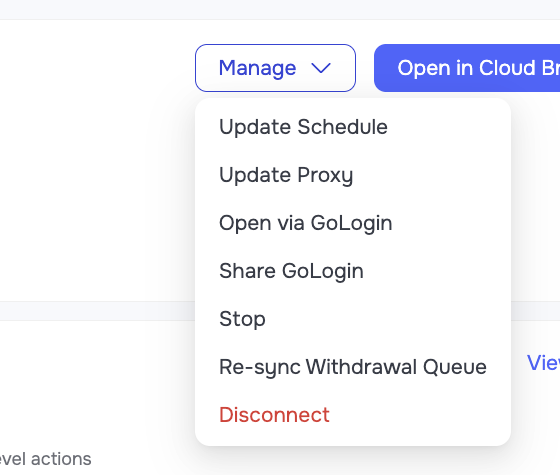
- Open Manage on the sender. In GetSales, open the sender profile and click Manage.
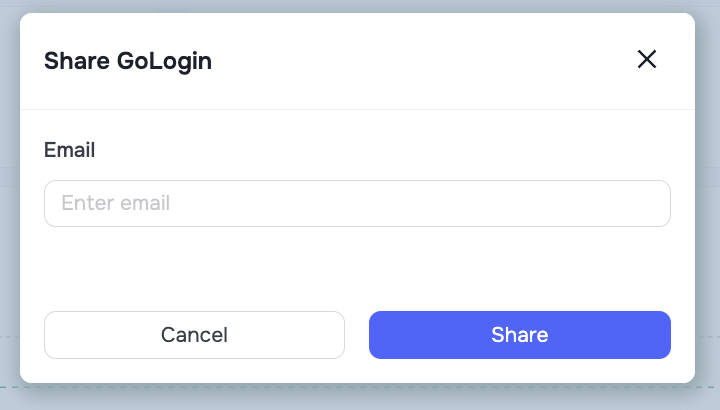
- Share GoLogin. Pick Share GoLogin and enter the email address on your GoLogin account.
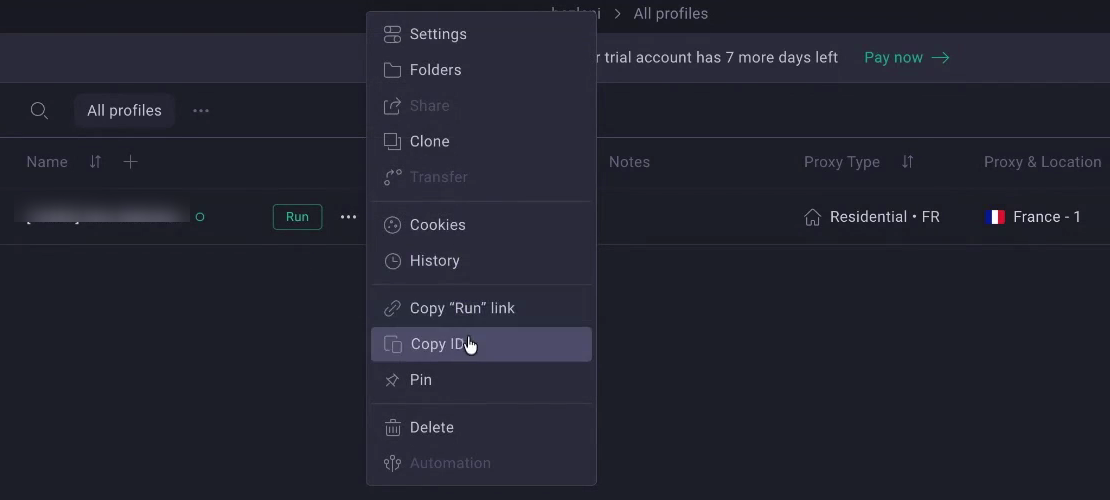
- Refresh GoLogin. Reload the desktop app or the browser version until the shared profile appears in your list.
- Copy the ID. Three dots on the profile row, then Copy ID.
- Paste it into GTM API. Back on the connect screen, Existing profile ID, then verify and connect.
Paste, verify and connect
Whichever route produced the ID, the last step is the same one field on the connect screen. The platform checks the profile exists and starts, finds the LinkedIn account already signed in inside it, and binds the two.
What runs on the free plan
A connected account does not need a paid plan to be useful. The forever free tier is one connected account and one user, with the full UI, the API and the MCP server behind it. Nothing is feature-gated: the free plan limits frequency and volume, never access. The ceiling is throughput, and everything is reachable.
That covers a slice of work that usually goes unautomated because it is too small to justify a seat: scheduling posts, accepting or declining incoming connection requests, and keeping the inbox and post comments moving. Run at that scale it is free LinkedIn automation on an account you already own, with no second login and no second anti-detect setup to pay for. Paid accounts start at $10 / account at volume, and the tier grid lives on the pricing page.
Putting an agent on the account
Once the account is bound it is reachable like every other GTM API account: a typed REST LinkedIn API and an MCP server over the same server-side safety layer. The docs report 250+ typed tools across 19 toolsets, each mapping one to one onto a REST endpoint. Two guardrails matter before an agent is pointed at a live profile. Anything that changes something outward returns a preview and waits for explicit confirmation before it reaches LinkedIn, and per-action daily budgets are checked before dispatch, so an agent that decides to send two hundred invitations gets stopped by the platform rather than by LinkedIn.
Four jobs a single connected account covers well:
- Content on a schedule. Draft the week’s posts, queue them, and let the agent handle the comment replies underneath them.
- Inbox triage. Read the conversations, classify them, draft the replies, and escalate the ones that need a human.
- Network hygiene. Accept or decline incoming connection requests on a rule the agent can restate back to you.
- Search and enrich into a play. Run a people search, enrich the rows, then hand the list to an outreach sequence on the same account.
The capability surface and the client setup are on the LinkedIn MCP server page, and the API side of the same contract on the LinkedIn API guide.
Two limit counters, one LinkedIn account
Each platform counts only its own sends. GetSales keeps its limit counters, GTM API keeps its own, and neither can see what the other has already done today. Connecting the account to a second platform therefore changes nothing on its own, and nothing is duplicated, reset or halved. What does add up is the real activity on the LinkedIn account: 20 connection requests from GetSales and 20 from GTM API are 40 requests as far as LinkedIn is concerned. Plan the two paces as one combined daily total, and measure that total against the account’s per-action limits.
The reason to reuse the profile at all is the other half of the safety picture. A fresh login from a new IP on a new fingerprint is exactly the event that triggers a verification challenge, and repeated challenges are how an account ends up restricted. Attaching to a session LinkedIn has already accepted skips that event. The rest of the account-health playbook, warm-up ramps and pacing included, sits on safe LinkedIn automation.
Frequently Asked Questions
Do I have to log in to LinkedIn again to connect my account to GTM API?
No, if you connect an existing GoLogin profile. That profile is already signed in, so the platform detects the logged-in account and binds it without a login form or a verification challenge. A cloud browser is different: it is a fresh anti-detect profile, and you sign in inside its browser window once.
Where do I find the GoLogin profile ID for a GetSales sender?
Two ways. Ask an assistant that has the GetSales MCP server connected to list the GoLogin IDs of your profiles. Or share the sender’s GoLogin profile to your own free GoLogin account from Manage in GetSales, refresh GoLogin, then use the three-dot menu on the profile row and pick Copy ID.
Will connecting to GTM API interfere with my GetSales automation?
No, and their limit counters are separate: GetSales tracks its own sending limits, GTM API tracks its own, and neither throttles because of the other. What stacks is the real activity on the account. Send 20 connection requests from each and the account has sent 40, so plan the two paces as one combined daily total against the account’s real per-action limits. One dependency does run between them: the GoLogin share is load-bearing, and removing it in GoLogin takes the GTM API side offline.
Can I connect a GoLogin profile that GetSales does not manage?
Yes. The connect screen asks for a GoLogin profile ID and nothing else, so any runnable profile signed into a LinkedIn account works the same way, whatever created it. GetSales is one common source of such profiles because it runs its senders in GoLogin, and the steps here are identical for a profile you built yourself.
Do I need a proxy when I connect an existing profile?
No. A bring-your-own profile keeps the proxy it already has, and GTM API does not replace or reconfigure it. That is the point of the option: the account keeps the IP and fingerprint LinkedIn has already accepted. Proxies are only provisioned on the cloud-browser route, where the platform attaches a managed residential proxy in a country you choose, or takes one you supply.
Is there a free way to automate LinkedIn on GTM API?
The free plan covers one connected account and one user with the full UI, the API and the MCP server, where the caps are on frequency and volume and nothing is switched off, which is enough for post scheduling, connection-request handling and inbox or comment work on a single account. Most tools in this category run their own free or trial tiers as well, so the comparison worth making is on volume.
Sources & Further Reading
- The walkthrough this page is built from, and the source of every clip and screenshot above: Connect GetSales to gtm-api.com: Run AI Agents on Your LinkedIn Accounts (No Re-Login) (4:19, gtm-api.com channel). Each section above opens that same recording at the timestamp for its step.
- gtm-api.com documentation, quoted above: Connect a LinkedIn account (the cloud-browser and existing-profile options), Antidetect browsers and proxies (what a profile and its proxy are, and how they attach), MCP server overview (the tool and toolset counts, the preview-and-confirm step and the per-action budgets) and Connect a client. Plan and price figures are from the pricing page.
- Model Context Protocol, the specification site, for the quoted definition of the protocol.
- GetSales, GetSales MCP: connect Claude and other AI assistants to your workspace, for installing that server. GoLogin profile sharing and the Copy ID menu are in the GoLogin app, gologin.com.
- Related: LinkedIn MCP server · The LinkedIn API · LinkedIn limits · Safe LinkedIn automation · LinkedIn account restricted
Connect the account you already have.
One connected account, one user, and the full UI, API and MCP behind it, on the forever free plan. No card, and no second login on an account LinkedIn already trusts.

Last updated: October 2026 · Definitions and benchmarks verified at time of publication